
AI at SurveyCTO
Discover principle-driven innovation that leverages AI technology to create solutions that support secure, high-quality data collection.
From optimizing survey design to providing context-aware support, our AI functionality is built to empower users at every technical level. Create best-practice surveys more efficiently while also ensuring full ownership and protection of your sensitive data.

Our history of innovation
Long before every site had a chatbot, we were thinking about ways to utilize sophisticated methods for better data, like automated quality checks and our review and corrections workflow. We’ve been researching machine learning for years to figure out the best way to use it to identify patterns in data collection workflows so users could identify and solve problems faster.
But like everything we do at SurveyCTO, quality and security guide us, meaning we don’t create features simply to keep up with trends. Instead, we research, develop, iterate tirelessly, and release features only if we are confident that they will enhance your data collection work.
Our growing suite of AI functionality reflects this commitment to cutting-edge innovation that respects user and respondent privacy while empowering you like never before in your data collection work.
Design, deploy, and monitor data workflows—faster than ever
Accelerate your impact with AI functionality built specifically for the demands and pace of your work.
With the SurveyCTO AI agent skill, AI-powered form design tools, and our context-aware Assistant, you have a complete toolkit to build high-quality surveys, map out connected workflows, and develop custom apps instantly.
It’s never been easier to orchestrate your dream data ecosystem—from custom survey apps to end-to-end workflows. Explore the tools below.
SurveyCTO AI agent skill and MCP server
Our latest AI development—available now in public beta—is an official SurveyCTO AI agent skill and MCP (Model Context Protocol) server.
Designed so that anyone can build connected data systems or tailored survey apps in minutes, these tools can vastly reduce the time it takes to:
- Design, edit, and troubleshoot XLSForms
- Create, customize, and troubleshoot field plug-ins
- Generate datasets, test data, and easily link them across multiple forms to create full survey workflows
- Spin up real-time data monitoring dashboards in Data Explorer
- Translate your forms to different languages
- Convert other forms into SurveyCTO forms
While the AI agent skill gives your favorite AI tool the specialized knowledge to be a SurveyCTO expert, pairing it with our MCP server supercharges your results—allowing the AI to actually implement and execute higher-quality actions on your behalf.
A note on usage and data security: Many AI coding tools promise solutions that can be built quickly and easily, but because they generate code from scratch, they can leave the final application vulnerable. The SurveyCTO AI agent skill, on the other hand, requires the built solution to be deployed within SurveyCTO’s secure infrastructure. You get the speed of AI-assisted help combined with our enterprise-grade security, including SOC 2 audited infrastructure and end-to-end encryption.
Additionally, while these tools are incredibly powerful, we also want to make sure you are using them safely. We highly encourage you to review your organization’s compliance, data security, and AI usage policies prior to using this skill to see how sensitive data and PII can remain fully protected.
AI-powered translation and transcription

Running audio audits, conducting open-ended interviews, and managing projects across different parts of the world requires heavy manual lift that comes with translating and transcribing responses. There can be hours of audio to listen to, and text responses in languages your team may not be familiar with.
With SurveyCTO’s AI-powered translation and transcription, audio is transcribed into analyzable text, and text is translated into any language, immediately.
- Get nuance and depth without spending hours manually processing responses
- Have full control over when you want to perform translation and translation work
- Scale the use of data quality-promoting and detail-heavy audio recordings without the associated manual lift
- Eliminate costs associated with third-party tools or services
- Keep workflows consolidated within SurveyCTO
Note: This feature uses AI credits. Learn more.
AI form tools
We applied rigorous research standards and testing to create survey design tools that could be greatly enhanced by AI technology for superior quality data collection.
Our AI form tools are integrated right within our online form designer to help you with key aspects of survey design: expression building and question review.
With these AI form tools, you can get immediate help in designing best-practice surveys.
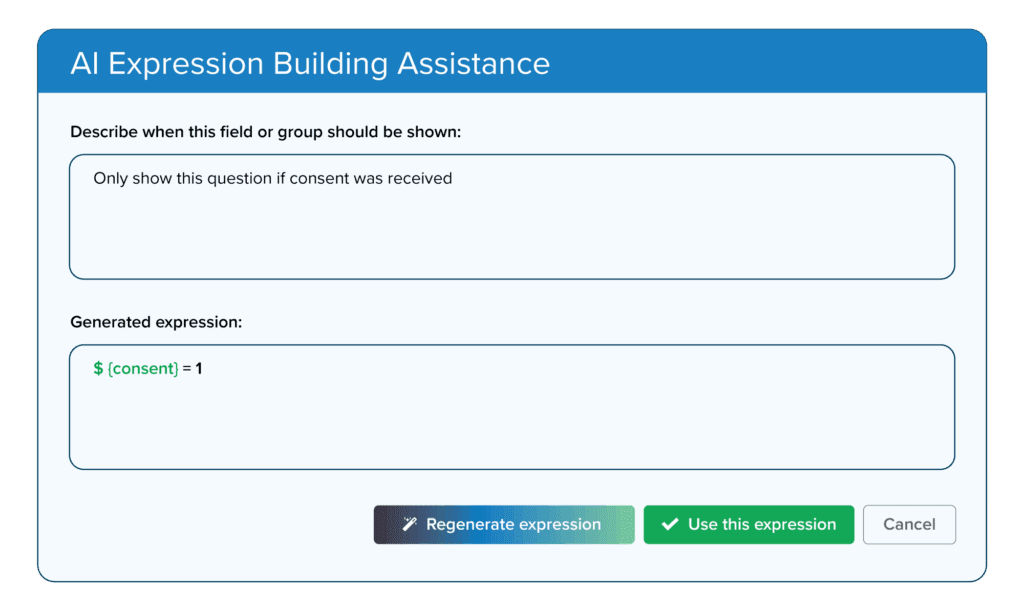
Expression building
Know which relevance, constraint, and calculation expressions to use in your forms can be difficult.
Ask for help using natural language to create the right expressions with the right syntax.
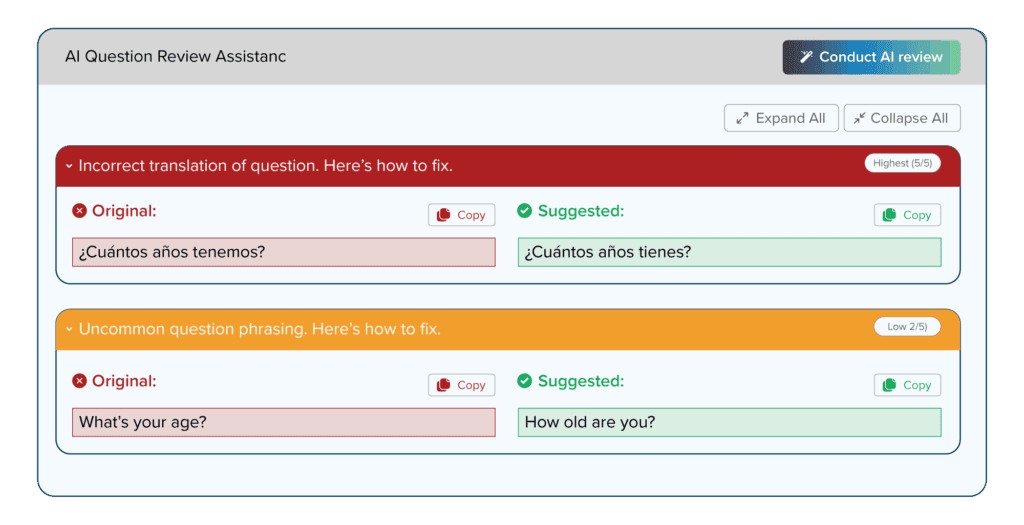
Question review
Get context-aware, quality-enhancing feedback on your forms with suggestions to improve question clarity, wording suggestions, and more.
AI Assistant

When we designed the SurveyCTO AI Assistant, we didn’t want just another chatbot. We wanted a tool that would add genuine value to users’ survey research and data collection work.
To get there, we engaged in rigorous research & development. Then, we custom-built the AI Assistant, trained it on SurveyCTO’s entire body of content across our website, product documentation, and support articles, and began an intensive process of evaluation.
This included defining “test sets” of conversation logs, re-running select test conversations, and then comparing the AI Assistant’s responses and evaluating them against set measures of quality. We also made sure the Assistant’s output was evaluated both by real humans, and other LLMs.
The result is a chatbot that’s here to help you learn all about SurveyCTO, and up your data collection game.
Check it out by clicking the blue Ask the SurveyCTO AI Assistant widget on the bottom right of any page as well as within our online Form Designer to get context-aware answers to your questions.
All of our AI features follow our strict data security principles. You control when you want to use them, which also means that the only data that’s leveraged by our AI tools is data you explicitly share while using them.
You decide exactly when to leverage our AI functionality—and when to keep it manual.
Frequently Asked Questions
Are SurveyCTO AI features available on all subscription plans?
The AI Assistant is free and available for everyone to use. You can find our Assistant on the bottom right-hand corner of every page on our website, product documentation, and Support Center, and within our online form designer in the Design tab.
AI form tool features are also within directly incorporated into our online form designer. It is currently free and available for all users on any subscription plan to use. However, Dobility reserves the right to limit or otherwise adjust usage in the future.
AI-powered translation and transcription features are available on all subscription plans. However, note that using translation and transcription features use AI credits. Learn more about AI credits.
How is data handled while using SurveyCTO AI features?
We take data security and data privacy seriously. Not only does this apply to security during data collection itself, it also applies to when you use our AI features to help you create your surveys. Specifically:
- Training: Neither Dobility nor our AI model providers use conversations with the AI Assistant or engagement with our AI form tool features to train AI models.
- Data access: Our AI form tools are designed to help you improve survey design and our AI Assistant is designed to answer any question you may have about SurveyCTO. The only data these tools have access to is the data you explicitly share. For example, if you need survey design help and upload your form definition, our AI tools will be able to see form definition information like field names. These tools do not have any access to your private information, form responses, or your organization’s information.
When using AI-powered translation and transcription features, take note of the following:
- Audio or text data is sent from your browser to a third-party cloud AI provider over an encrypted connection.
- Audio files, text responses, and transcripts remain on your SurveyCTO server unless you explicitly transcribe or translate that data.
- We do not use your data to train AI models. The third-party AI provider does not retain your data beyond what is required to process the request.
For more information, please refer to our Privacy Policy and our Privacy and Data Handling documentation.
I'm already a SurveyCTO user. How can I get access to the AI form tool features?
How do AI agent skills, the Model Context Protocol (MCP), and MCP servers relate to one another?
These three components work together to turn a standard AI agent (like Claude or ChatGPT) into an experienced SurveyCTO agent. Here is the breakdown:
- The skill supplies the AI agent with the specialized, expert knowledge it needs to understand SurveyCTO, interpret your goals, and respond with best-practice recommendations.
- The Model Context Protocol (MCP) is the open standard (i.e. publicly available and openly governed) protocol that defines the set of instructions that allow AI agents to connect to other data sources or tools.
- MCP servers contain the set of tools (i.e. they act as the virtual hands) that let the agent actually perform the specialized actions instead of simply providing a chatbot response.
Can I use the SurveyCTO AI skill without the MCP server?
Yes, you can. By itself, the SurveyCTO AI agent skill acts as a highly knowledgeable consultant. It adds specialized SurveyCTO expertise to your preferred AI agent (like Claude or ChatGPT), allowing you to ask complex questions about survey design and data collection best practices and get expert advice—similar to using our native AI Assistant.
However, we highly recommend pairing the skill with the MCP server to realize its full benefits. If the skill is the expert consultant, the MCP server is the expert builder. Instead of just telling you how to build a field plug-in or connect a dataset, pairing the two allows the AI to actually execute those actions for you. It shifts the AI from simply answering questions to actively doing the heavy lifting, radically speeding up your workflow development.
Is it safe to use AI agents to build data collection workflows?
When discussing the risks of AI code generation—often referred to as “vibe coding”—it is important to distinguish between two separate classes of risk:
- User-to-agent interaction risks: This involves a user accidentally sharing PII or secure API credentials directly with an AI agent (like ChatGPT or Claude). This risk exists anytime an organization uses AI chatbots and should be addressed by your organization’s internal AI usage or data security policies.
- Application vulnerability risks: This is the much larger risk associated with vibe coding. When an AI generates an application from scratch, the finished product often lacks the modern infrastructure and QA required for security, stability, and scalability.
This second risk is what SurveyCTO addresses.
By using the SurveyCTO AI agent skill, the AI is not building an application from scratch; it is building on top of SurveyCTO. Our platform acts as a secure intermediate layer. Because the resulting application(s) must be deployed via SurveyCTO, it is forced to operate within our SOC 2 audited infrastructure.
This means every workflow generated by the AI is ultimately protected by SurveyCTO’s enterprise-grade security, including our public-private key encryption and end-to-end encryption.